
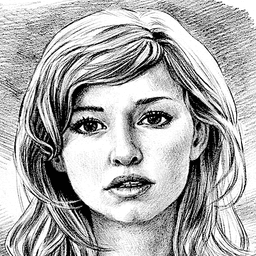
Screenshots
About Pencil Sketch
Transform your photos into stunning pencil sketches with Pencil Sketch, the intuitive photo editor that turns anyone into an artist. Whether you're drawing inspiration from your gallery or capturing a fresh moment with your camera, creating beautiful sketches is just one tap away. Choose between black-and-white or color sketches to match your artistic vision.
Explore four distinct artistic styles to find your creative voice. The Pencil style delivers smooth, handcrafted lines perfect for those who love traditional drawings. Sketch mode captures precise contours for realistic detail. Doodle transforms portraits into playful cartoon versions—ideal for making your selfies stand out on social media. Comic style works across any photo, giving images a bold graphic novel aesthetic that captures attention instantly.
Beyond sketch conversion, Pencil Sketch is a complete photo editing suite. Enhance your images with one-tap auto adjustments, or take manual control with tools to fine-tune exposure, contrast, color temperature, and saturation. Add professional polish with sharpness adjustments, apply gorgeous filters and frames, insert fun stickers, draw directly on your photos, and overlay custom text. Every editing feature works seamlessly together to help you craft the perfect composition.
If you prefer pure creativity, skip photos entirely and draw original doodles on the built-in canvas. Full control over colors, pencil styles, and erasers gives you the freedom to express yourself from scratch. Your artistic experiments are saved automatically to your device in a dedicated Pencil_Sketch folder.
Saving and sharing your finished works takes seconds. Post directly to Facebook, Twitter, email, messaging apps, or anywhere else your audience gathers. Since all editing happens offline, you can create masterpieces anytime, anywhere—no internet connection needed.
Whether you're an aspiring artist, a social media creator, or someone who simply loves transforming memories into art, Pencil Sketch makes professional-quality artistic conversion accessible to everyone. Turn ordinary moments into extraordinary works of art with Pencil Sketch today.
Pros & Cons
Pros
- Four distinct artistic styles let you match your creative vision
- Complete photo editing suite with manual and auto adjustment tools
- Works entirely offline, so you can create anywhere anytime
- Draw original doodles on canvas with full color and brush control
Cons
- All edited photos stored locally only, no cloud backup mentioned
- AI-powered sketch conversion may not work well on every photo type
- Android-only app with no iOS or desktop version available
Related Apps

GIMP
Open-source photo editor and digital art studio with professional tools for retouching and illustration.

Paint.NET
Free photo editing software with layers, effects, and unlimited undo for Windows.

Photoscape
Photo editor with viewer, collage maker, GIF creator, and batch tools—all in one free app.

3D Emoji Face Camera
KEVIN STUDIO
3D emoji face camera with live filters and animated effects. Create fun selfies instantly.

Profile Picture Downloader HD
helalik
Download Instagram profile pictures in HD — no login required, view and save instantly.
Beauty Camera Plus
Photo Created
Photo editor with beauty filters for selfies, portraits, and real-time enhancement — free download.
Latest Articles

Best AI admin task automation apps for desktop in 2026 (we tested 7)
Jul 11, 2026

Best AI coding tutor apps for desktop in 2026 (we tested 7)
Jul 11, 2026
Best apps for AI red teaming on desktop in 2026 (free and paid)
Jul 11, 2026

Best apps for the *arr media stack on desktop in 2026 (we tested 7)
Jul 11, 2026
Best apps for benchmarking local LLMs on desktop in 2026 (free and paid)
Jul 11, 2026